3.4K 

响应菜单项
现在,我们已经将我们的 DoNothing 插件作为一个菜单项加入到 Qt Creator 中。既然菜单项就是一个QAction,我们当然可以通过连接triggered(bool)或者toggled(bool)信号,响应 trigger、toggled 事件。下面的代码显示了如何去做:
class DoNothingPlugin : public ExtensionSystem::IPlugin
{
    Q_OBJECT
public:
    ...

private slots:
    void about();
};

bool DoNothingPlugin::initialize(const QStringList& args, QString *errMsg)
{
    Q_UNUSED(args);
    Q_UNUSED(errMsg);
    ......
    Core::Command* cmd = am->registerAction(
        new QAction(this),
        "DoNothingPlugin.AboutDoNothing",
        Core::Context(Core::Constants::C_GLOBAL));
    ......
    connect(cmd->action(), SIGNAL(triggered(bool)), this, SLOT(about()));
    ......
    return true;
}

void DoNothingPlugin::about()
{
    QMessageBox::information(
            0,
            "About DoNothing Plugin",
    	    "Seriously dude, this plugin does nothing"
        );
}
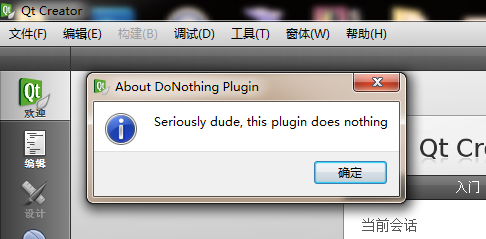
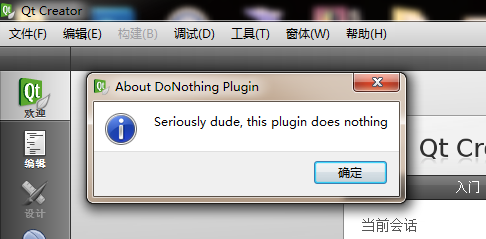
我们重新编译下插件,然后运行 Qt Creator,点击一下 DoNothing 菜单项,就会弹出一个对话框:
如果你想使用 Qt Creator 主窗口作为 parent,那么只要按照下面的代码进行修改:
void DoNothingPlugin::about()
{
    QMessageBox::information(
    	    Core::ICore::instance()->mainWindow(),
    	    "About DoNothing Plugin",
    	    "Seriously dude, this plugin does nothing"
        );
}
添加菜单
前面我们介绍了如何添加菜单项,下面我们将介绍如何向 Qt Creator 添加菜单。添加菜单,我们不能使用Core::Command,而是应该使用Core::ActionContainer,将其添加到MENU_BAR上面。下面的代码显示了如何进行这一操作:
bool DoNothingPlugin::initialize(const QStringList& args, QString *errMsg)
{
    Q_UNUSED(args);
    Q_UNUSED(errMsg);

    Core::ActionManager* am = Core::ICore::instance()->actionManager();

    // Create a DoNothing menu
    Core::ActionContainer* ac = am->createMenu("DoNothingPlugin.DoNothingMenu");
    ac->menu()->setTitle("DoNothing");
    // Create a command for "About DoNothing".
    Core::Command* cmd = am->registerAction(
        new QAction(this),
        "DoNothingPlugin.AboutDoNothing",
        Core::Context(Core::Constants::C_GLOBAL));
    cmd->action()->setText("About DoNothing");
    connect(cmd->action(), SIGNAL(triggered(bool)), this, SLOT(about()));
    // Add DoNothing menu to the menubar
    am->actionContainer(Core::Constants::MENU_BAR)->addMenu(ac);
    // Add the "About DoNothing" action to the DoNothing menu
    ac->addAction(cmd);

    return true;
}
下面我们来看一下运行结果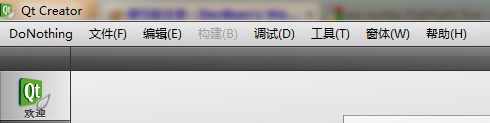
修改菜单或菜单项的位置
现在,我们已经了解如何向 Qt Creator 添加菜单项,如何向 Qt Creator 添加菜单。只不过还有一个问题:我们添加的菜单或者菜单项都是在第一个位置。如果修改新增菜单或菜单项的位置呢?下面来看看这一段代码,我们要将“DoNothing”菜单放到“Help”前面:
bool DoNothingPlugin::initialize(const QStringList& args, QString *errMsg)
{
    Q_UNUSED(args);
    Q_UNUSED(errMsg);

    Core::ActionManager* am = Core::ICore::instance()->actionManager();

    // Create a DoNothing menu
    Core::ActionContainer* ac = am->createMenu("DoNothingPlugin.DoNothingMenu");
    ac->menu()->setTitle("DoNothing");
    // Create a command for "About DoNothing".
    Core::Command* cmd = am->registerAction(
        new QAction(this),
        "DoNothingPlugin.AboutDoNothing",
        Core::Context(Core::Constants::C_GLOBAL));
    cmd->action()->setText("About DoNothing");
    connect(cmd->action(), SIGNAL(triggered(bool)), this, SLOT(about()));
    // Insert the "DoNothing" menu between "Window" and "Help".
    QMenu* helpMenu = am->actionContainer(Core::Constants::M_HELP)->menu();
    QMenuBar* menuBar = am->actionContainer(Core::Constants::MENU_BAR)->menuBar();
    menuBar->insertMenu(helpMenu->menuAction(), ac->menu());
    // Add the "About DoNothing" action to the DoNothing menu
    ac->addAction(cmd);

    return true;
}
重新编译之后运行一下:
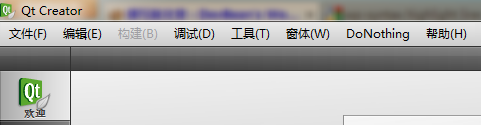
现在,DoNothing 菜单已经在 Help 前面,而不是在菜单栏的第一位了。同样,我们可以用类似的方法将菜单项插入到任意的位置。代码是类似的,这里不再赘述。
附件下载:DoNothing 插件文件

1 个评论
期待您关于有限状态机FSM方面的分享~